
Assigning Agents and Joining Conversations in Acele Live Chat
In Acele Live Chat, assigning agents and joining conversations helps deliver personalized human support via WhatsApp. Agents can take over a conversation from the bot, optionally send a signature message, and manage the chat professionally—ensuring clear ownership and accountability.
This guide explains how agent assignment works, how to join chats, how signature messages function, and how to maintain a seamless support experience.
🔹 Feature Breakdown
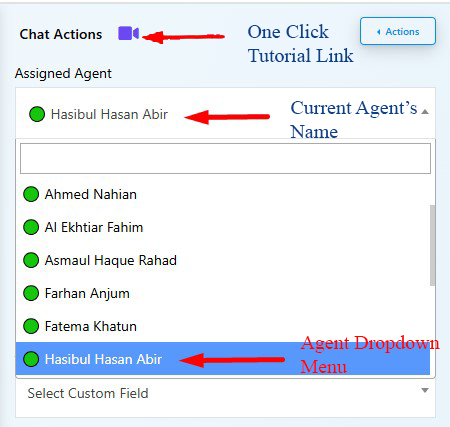
1️⃣ Agent Assignment Panel
- Located under the “Chat Actions” section.
- Shows the currently assigned agent.
- Allows selection of a new agent via a dropdown.
- When a new agent is selected, the previous agent is automatically removed.
2️⃣ Join Chat & Signature Message
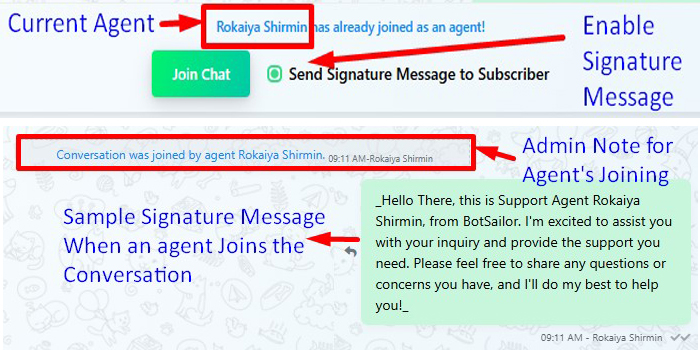
- Clicking Join Chat gives the agent full control of the WhatsApp conversation.
- The option “Send Signature Message to Subscriber” appears as a checkbox.
- When enabled, it sends a personalized greeting from the agent to the user.
3️⃣ Signature Message Behavior
- Appears as a green bubble in the chat.
- Confirms the new agent has joined (e.g., “Conversation was joined by agent Priya Sharma.”).
- Shows a pre-written message such as:
“Hi, this is Support Agent [Name] from Acele. I’m here to assist you over WhatsApp.”
4️⃣ Tutorial & Shortcut Link
- A One-Click Tutorial Link is available beside Chat Actions for quick video walkthroughs.
💼 Use Cases
- Customer Support Teams: Assign queries to specific team members and track who is handling each WhatsApp user.
- Sales Teams: Engage leads directly with personalized WhatsApp messages.
- Shift Handover: Seamlessly transfer chats to another agent during shift changes.
- Bot-to-Human Escalation: Let agents take over with a branded human greeting when needed.
✅ Conclusion
Assigning agents and using signature messages in Acele Live Chat creates a clear, trustworthy, and human experience for WhatsApp users. It ensures users always know who they’re chatting with, reduces confusion, and enhances support quality.
❓ Frequently Asked Questions
Can more than one agent join the same chat?
No. When a new agent joins, the previous one is automatically removed.
Is the signature message mandatory?
No, it’s optional—but highly recommended for user clarity and trust.
Where can I set or edit my signature message?
Go to Dashboard → Team Account, then click the agent’s profile to customize the message.
Will users be notified when an agent changes?
Yes, a system note appears: “Conversation was joined by agent [Name].”
Can I restrict some agents from joining chats?
Yes, agent access can be limited through role-based permissions.
